Adding Custom Features to Your Model
The features given to the model can often be the deciding factor for how well a model can produce accurate predictions. This is arguably even more so when approaching the problem using a method such as Active Learning, where you may only be using a tiny fraction of your entire dataset.
Custom Features
Custom generated features can be added as a new function to astronomicAL.extensions.feature_generation.
There are some requirements when declaring a new feature generation function:
The new function must have two input parameters:
df- The DataFrame containing the entire dataset.
n- The number of features involved in the operation.Note
If your particular operation does not easily scale to more than two features at a time, then you can simply not make use of the
ninput parameter inside your function. However you must still includenas an input parameter, even if you don’t use it.
The function must return the following:
df- The updated dataframe with the newly generated features.
generated_features- a list containing the updated column names.
The created function must be added as a new value to the
operdictionary within theget_oper_dictfunction, with a brief string key identifying the operation.
Within the function, you can generate the combinations of features using:
1base_features = config.settings["features_for_training"]
2combs = list(combinations(base_features, n))
Creating Colours
Given the prevalence of photometry data in astronomical datasets, the most common additional features to create are colours. In AstronomicAL, these are provided with the default subtract (a-b) with a combination value of 2.
Example: Max(a, b)
In this example, we will show how we would create a new max function. Although the produced features from this specific function may not be particularly useful for improving this model’s performance, it works well as an example.
 1def max_oper(df, n): # The function must include the parameters df and n
 2
 3    np.random.seed(0) # set random seed if required for reproducability
 4
 5    base_features = config.settings["features_for_training"] # get the base features chosen by the user
 6
 7    combs = list(combinations(base_features, n)) # a list of all the combinations of n base_features
 8
 9    cols = list(df.columns) # all the columns in the dataset
10    generated_features = [] # The list that will keep track of all the new feature names
11
12    for comb in combs: #loop over all combination tuples
13
14        # This loop is to create the feature name string for the dataframe
15        new_feature_name = "max(" # start of feature name
16        for i in range(n): # loop over each feature in tuple
17            new_feature_name = new_feature_name + f"{comb[i]}" # add each feature in operation
18            if i != (n - 1):
19                new_feature_name = new_feature_name + "," # seperate features by a comma
20            else:
21                new_feature_name = new_feature_name + ")"
22
23        generated_features.append(new_feature_name) # add new feature name which is the form: max(f_1,f_2,...,f_n)
24
25
26        if new_feature_name not in cols: # if the feature already exists in the data, dont recalculate
27
28            # This loop applies the operation over all the feature in the combination and adds it as the new column in the dataframe
29            for i in range(n): # Loop of each individual feature in comb
30                if i == 0:
31                    df[new_feature_name] = df[comb[i]] # add the new column and set its value to the starting feature (without this you will get a KeyError)
32                else:
33                    df[new_feature_name] = np.maximum(df[new_feature_name], df[comb[i]]) #calculate the running maximum
34
35    return df, generated_features  # The function must return the updated dataframe and the list of generated features
Finally, adding the new entry in the oper dictionary, without specifying the parameters:
def get_oper_dict():

    oper = {
        "subtract (a-b)": subtract,
        "add (a+b)": add,
        "multiply (a*b)": multiply,
        "divide (a/b)": divide,
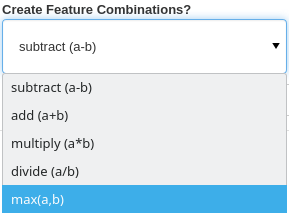
        "max(a,b)": max_oper, # Newly created function
    }

    return oper
And that is all that is required. The new max_oper function is now available to use in AstronomicAL: